If you’re searching for the best external SSD for photographers, I’m about to save you hours of frustration and maybe even your sanity. I’m about to say something that might go against everything you’ve ever been told as a photographer.
If you’re editing from an external hard drive you’re slowing yourself down…. A LOT!
I know, I know… for years, I was taught the exact opposite. 👉 “Always edit from an external hard drive.” So that’s what I did. Every wedding, every session, thousands and thousands of RAW files… ALL living on an external hard drive. And for the longest time, I could not figure out why Lightroom was SO slow.
I honestly thought that something was wrong with my computer, or Lightroom itself. I even thought, “Maybe I need a better computer.”
Turns out, that wasn’t the problem at all. The real issue was where I was editing from. Traditional external hard drives are slow. Not “a little annoying” slow, but slow in a way that quietly kills your workflow.
Here’s the part that no one explained to me early on. Regular external hard drives have moving parts inside them. Tiny machines that physically spin and search for your files every time you click.
Now imagine asking that drive to handle thousands of RAW files, large previews, large catalogs, and real time edits… all at the same time. It’s like asking someone to spring while carrying boxes.
Of course Lightroom struggles.
At some point, I realized there had to be a better way. A faster, smarter way to work.
That’s when I discovered SSD drives.
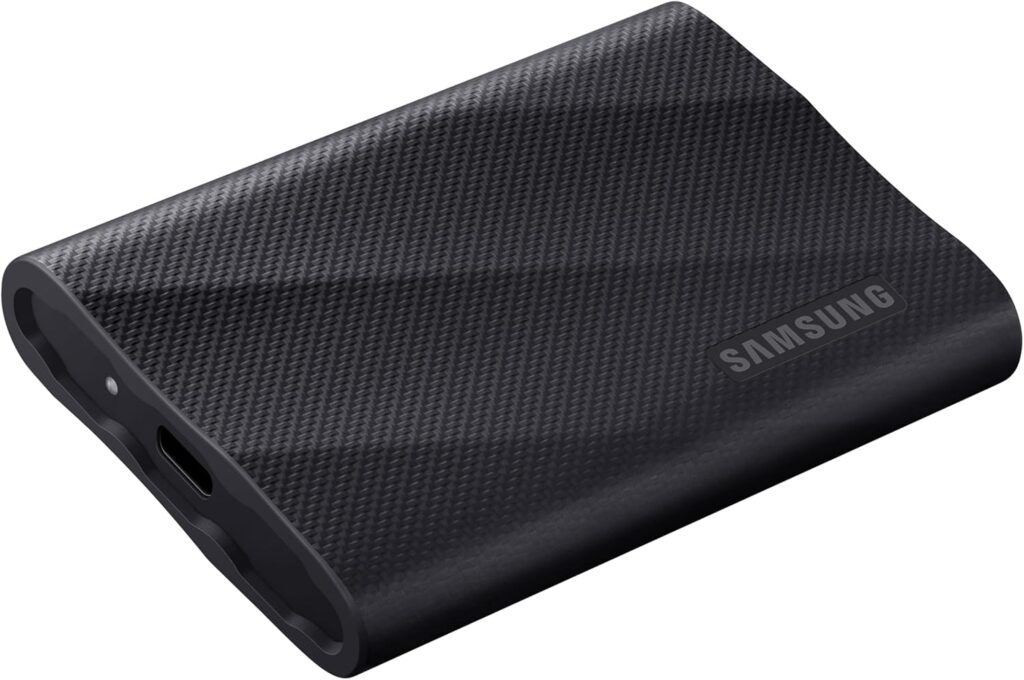
The first time I edited from an SSD drive, I couldn’t believe the difference!
- Lightroom opened faster.
- Photos loaded instantly.
- Exports finished way quicker.
- Editing stopped feeling heavy.
- Editing felt… fun.
That’s why when photographers ask me about the best external SSD for photographers, I always say this matters more than upgrading your camera body.
SSDs don’t have moving parts. They are built for speed. They can handle huge files without choking, lagging, or freezing every time you zoom in. Your computer works less because your SSD does more.
If you’re editing weddings, families, or sessions with lots of RAW file, choosing the best external SSD for photographers can completely change your workflow.
This was one of those “I wish someone told me sooner” moments. So I’m telling you now.
If Lightroom feels slow, if editing feels frustrating, if you dread sitting down at your computer… look at where you’re editing from.
I personally use an SSD from Amazon that I love and trust, and it’s hands-down one of the best upgrades I’ve made for my business.
If you’re looking for the best external SSD for photographers, start here. Move a few files over, open Lightroom, and feel the difference for yourself.
And if you’re reading this right before Christmas?
Give yourself some editing joy. Add it to your list or casually drop it in the family group chat. 😉
SSDs are also more reliable. No moving parts means fewer chances of failure, which matters when your work and income live on that drive. If you want faster, smoother editing without the stress, you can check out the one I personally use here.